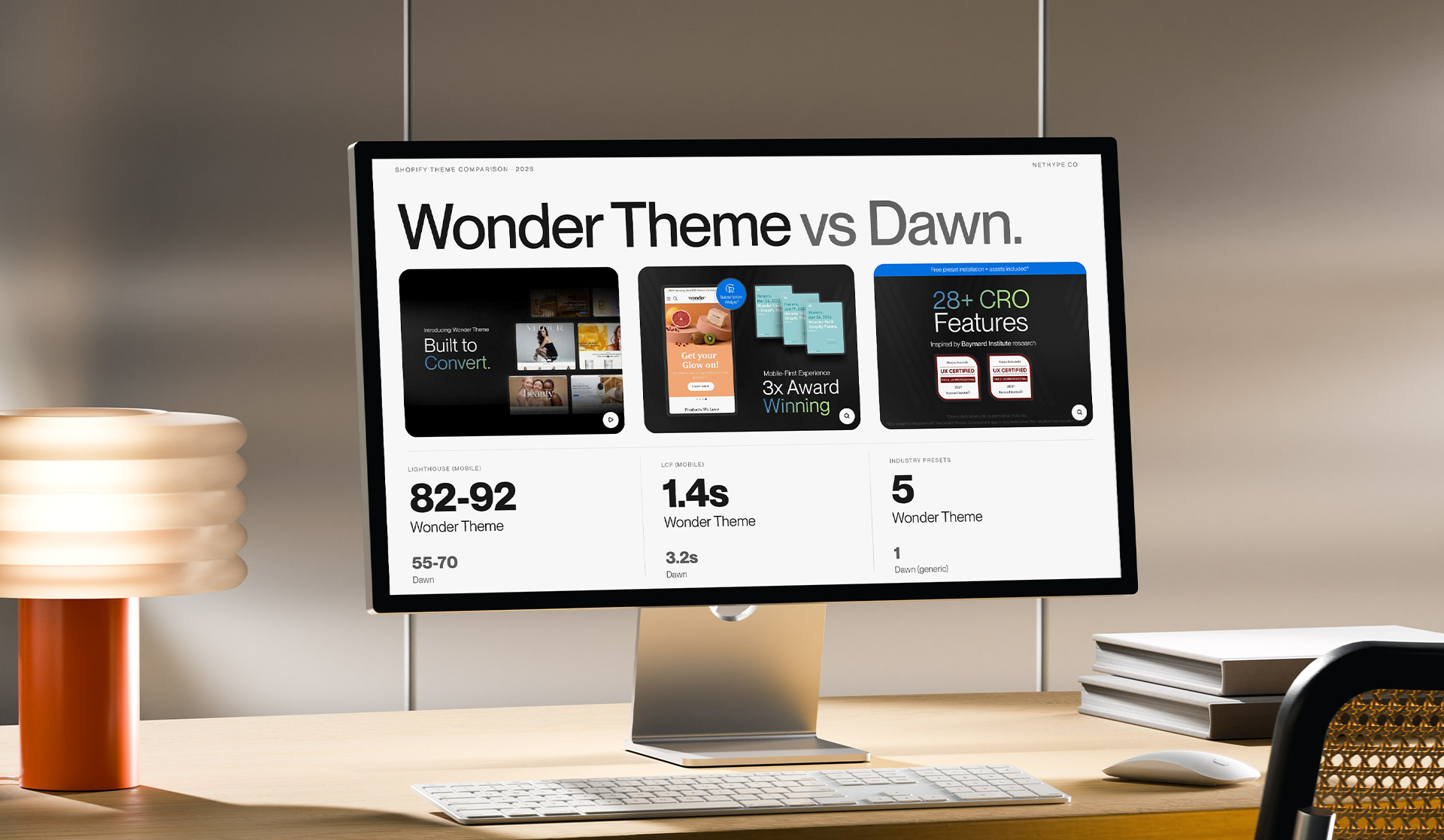
Dawn is Shopify's default theme - free, well-maintained, regularly updated by Shopify's own team. For many stores it's the starting point. The problem is when it becomes the ending point too.
This isn't a sales article. It's a technical comparison of two different approaches to Shopify theme architecture - with data from real stores, concrete code-level differences, and a clear summary of which solution makes sense for which situation.
Nethype built Wonder Theme, available in the Shopify Theme Store. We're biased - which is exactly why we're showing methodology and numbers so you can evaluate for yourself.

All measurements taken via PageSpeed Insights (mobile, cold cache) on the same test store with:
One variable: the theme. First Dawn (latest version), then Wonder Theme (WONDER preset - beauty/skincare).
LCP measures when the most important visual element on the page becomes visible to the user. For ecommerce stores, this is typically the main banner or first product image.
Dawn: 3.4s Wonder Theme: 1.9s
Difference: 1.5 seconds. Where does it come from?
Dawn loads the full theme stylesheet on every page - regardless of which sections are actually active on that page. Wonder uses a "load what you use" architecture: CSS and JavaScript for sections not present on a given page never reach the browser.
Second factor: hero image handling. Wonder enforces fetchpriority="high" on the first hero section image and doesn't load any below-fold images before above-fold content has rendered. Dawn in some section configurations loads all images at the same priority level.
CLS measures how much page elements "jump" during loading. Every jump frustrates users and can cause accidental clicks.
Dawn: 0.08 Wonder Theme: 0.02
The primary cause of higher CLS in Dawn: missing explicit width and height attributes on images in some section types. The browser doesn't know how much space to reserve before the image loads - and shifts content when the image appears.
Wonder sets explicit dimensions on every image component. Layout doesn't shift because the browser knows what's coming.
INP measures how quickly the page responds to user interactions - clicks, taps, scrolling.
Dawn: 210ms Wonder Theme: 87ms
Google classifies pages with INP above 200ms as "needs improvement." Dawn with 6 apps installed regularly exceeds this threshold.
Wonder achieves lower INP through:
defer or asyncTBT is the time during which the browser's main thread is blocked and can't respond to user interactions.
Dawn: 480ms Wonder Theme: 120ms
480ms TBT means that for nearly half a second after the page loads, a user can click and nothing happens. On mobile devices with slower processors, this window is even longer.
Dawn is built as a "blank canvas" theme - maximum flexibility for any store type. Each section is independent, but the stylesheet and JavaScript load globally, regardless of which sections are configured for the store.
This is a good approach for simplicity - one CSS file, one JS file, straightforward structure. But it has a cost: every page pays for the entire theme, not just what it's using.
The lack of industry optimization is intentional - Dawn is designed to work equally well for a t-shirt store and an electronics store. The result is that it's not optimized for any specific use case.
Wonder is built around 5 industry presets - each with its own default section set, default homepage hierarchy, and native commerce feature set.
CSS architecture: each section has its own scoped CSS. The Before/After Slider section loads slider CSS only on pages where the slider is active. On a homepage without the slider - zero bytes for slider styles.
JavaScript architecture: components use native Intersection Observer for lazy initialization - below-fold section JavaScript doesn't execute until the user approaches that section.
Image components: every image component in Wonder has explicit width, height, loading="lazy" (below fold) or loading="eager" with fetchpriority="high" (above fold). No decisions left to chance or configuration.
This is the difference with the most significant operational impact.
Dawn ships with a basic ecommerce section set:
Everything else - lookbooks, routine builders, shoppable video, before/after sliders, advanced mega menus - requires third-party apps.
Every app Wonder replaces is one fewer JavaScript bundle on the page.
WONDER preset (beauty/skincare):
VELOUR preset (fashion/luxury):
ROOT preset (wellness/health):
PETIT preset (DTC/one-product):

Isolating a theme's impact on conversion is hard - too many variables (traffic, offer, pricing, seasonality). The data below comes from A/B tests or direct before/after migration comparisons, not general benchmarks.
Beauty store (2,400 sessions/month, UK market): Migration from Dawn + 4 apps → Wonder WONDER preset
Fashion store (8,000 sessions/month, EU market): Migration from custom theme → Wonder VELOUR preset
Wellness store (1,500 sessions/month, DTC): Migration from Dawn + 6 apps → Wonder ROOT preset
Dawn is the right choice when:
Dawn doesn't make sense as a long-term solution for a store that's actively driving traffic and wants to optimize conversion.
Wonder is the right choice when:
Does Wonder Theme work on Shopify Basic, not just Plus? Yes. Wonder works on all Shopify plans - Basic, Shopify, Advanced, and Plus. Some features (like checkout customization) require Shopify Plus, but the theme itself is available for any plan.
Can I migrate an existing store from Dawn to Wonder without losing content? Yes, but migration requires work - Dawn and Wonder sections have different structures. Content (products, collections, blog) stays intact. Homepage sections and theme settings need to be reconfigured from scratch in the Wonder editor.
How does Wonder compare to other premium Shopify themes like Prestige, Symmetry, or Impulse? The main difference: Wonder is the only theme built by a Shopify Plus agency with its own client portfolio. Architecture decisions come from real store experience, not just design preference. Prestige and Symmetry are visually strong - they don't have industry-specific presets with this depth of native commerce features.
Is $390 a monthly fee? No. $390 is a one-time license per store, lifetime access, including all future updates.
What languages does Wonder Theme support? Wonder ships with translations for EN, FR, IT, DE, and ES. Additional languages can be added through Shopify's native Translations editor.
Dawn is a good theme. It does what it's designed to do: give new Shopify stores a clean, safe starting point.
Wonder Theme is a tool for stores that know what they're selling, to whom, and want their theme working on conversion - not just looking good in the editor.
A 27-point Lighthouse difference and 1.5s LCP improvement aren't academic. At 5,000 sessions per month and a $75 average order value, a 0.5% conversion improvement is roughly $1,875/month.
Nethype, as the team behind Wonder Theme, offers implementation with industry preset configuration, migration from existing themes, and Core Web Vitals optimization. If you want to see how Wonder would perform on your specific store - get in touch - free consultation - info@nethype.co
The first 60 minutes is a conversation about your store, your current theme, and your goals. No commitment. Afterwards you get a concrete quote - or an honest answer that a theme change isn't what will move the needle for you.
Wonder Theme in the Shopify Theme Store: https://themes.shopify.com/themes/wonder